Automated AI vulnerability scanners and autonomous botnets have permanently transformed the threat landscape for WordPress website operators. Rather than relying on static keyword lists or brute-force credential stuffing, modern crawlers utilize LLM-assisted pattern engines to analyze live web responses, identify unpatched PHP server flaws, and inject stealth malware payloads into origin directories within seconds. In this comprehensive engineering guide, we dissect the mechanics of AI-driven vulnerability probes and provide an airtight, 4-layer origin hardening framework to protect your WordPress site.
The 2026 Threat Landscape: How Autonomous AI Scanners Target WordPress
Over 43% of the web is powered by WordPress, making it the most scrutinized software ecosystem on the planet. Traditional automated attacks relied on rudimentary dictionary lists and known exploit signatures. Modern AI exploit scanners operate fundamentally differently:
- Abstract Syntax Tree (AST) Fuzzing: AI crawlers probe exposed AJAX and REST endpoints with dynamically generated variable payloads, analyzing subtle timing variations (TTFB deviations) to identify unhandled SQL injection and remote code execution (RCE) bugs.
- Differential Error Fingerprinting: When a server throws a generic error, AI scanners parse stack traces, exposed PHP warning headers, and HTTP 500 signatures to deduce exact PHP runtime versions (e.g., PHP 8.1 vs 8.2) and installed plugin directories.
- Origin IP De-Cloaking: Attackers actively search for the true origin server IP behind Cloudflare edge proxies using historical DNS records, leaked MX email headers, XML-RPC pingback callbacks, and SSL certificate transparency logs. Once the origin IP is discovered, all edge CDN firewall protections can be bypassed completely.
To defend against request probing and clickjacking at the browser layer, every production site must implement strict security policies. Read our detailed engineering guide on adding HTTP security headers in WordPress to configure CSP, HSTS, and X-Content-Type-Options headers.
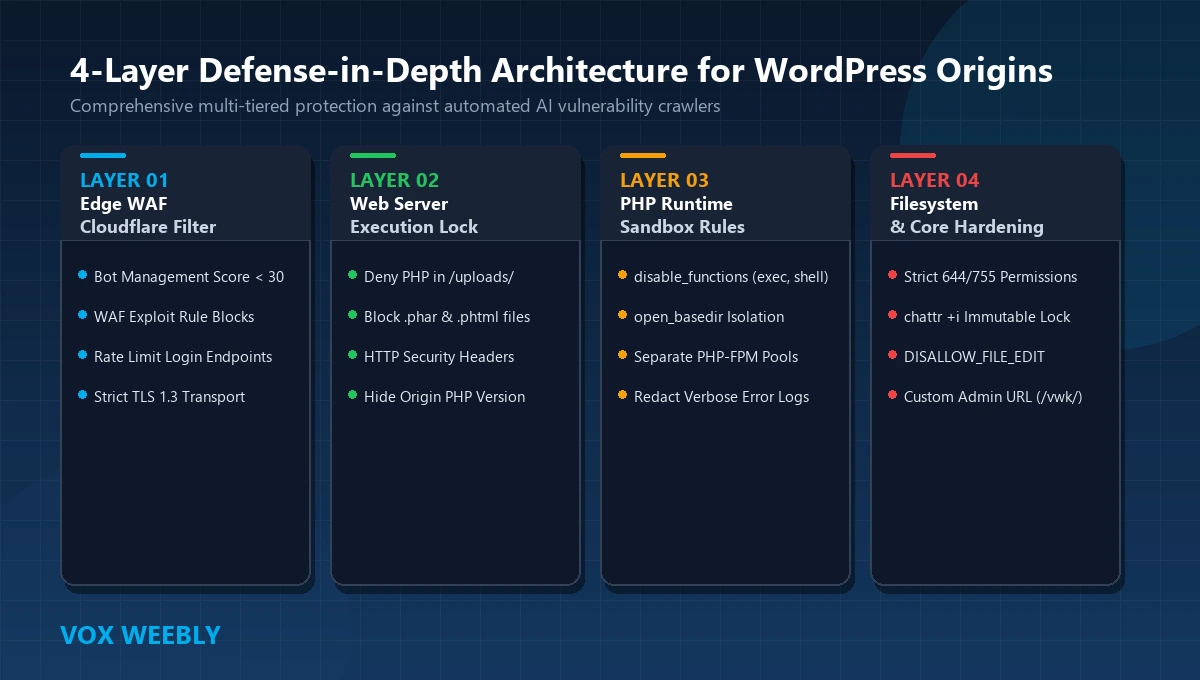
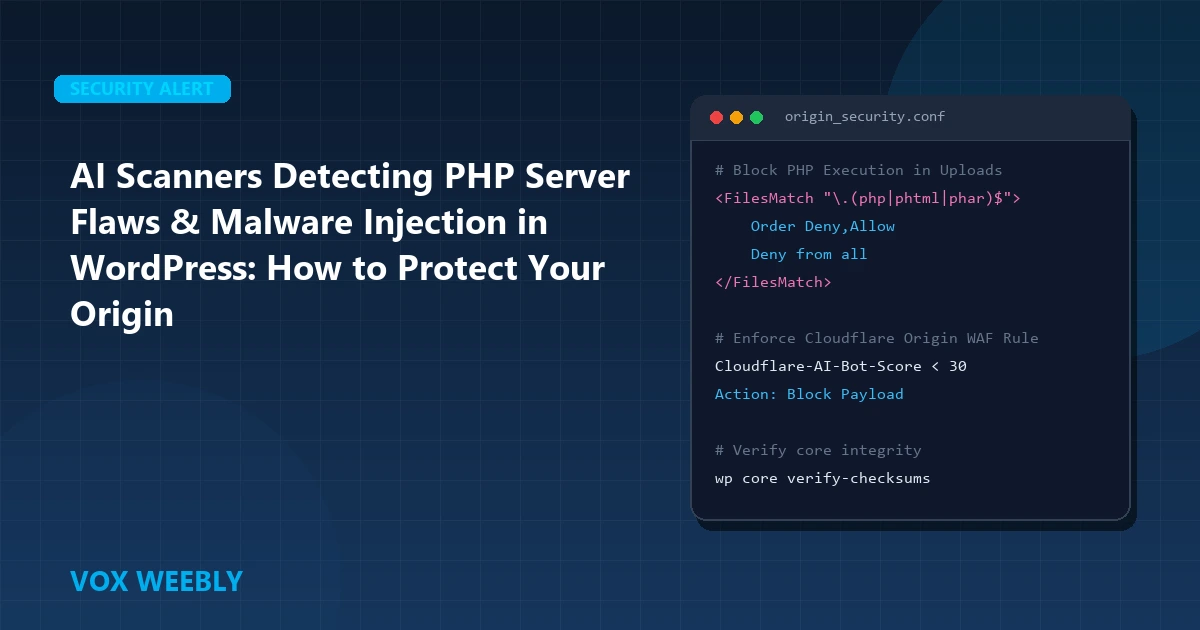
Figure 1: The 4-Layer Defense-in-Depth Origin Security Framework for Enterprise WordPress Sites.
Anatomy of a WordPress PHP Malware Injection Attack
Understanding how malicious payloads penetrate and persist inside a WordPress origin allows engineers to deploy targeted defensive countermeasures. A typical attack unfolds across four discrete phases:
Phase 1: Initial Infiltration
The automated scanner exploits a vulnerable third-party plugin with an unauthenticated file upload flaw or an insecure deserialization vector. Even if the uploader restricts .php extensions, attackers disguise executable PHP code inside fake image headers (e.g., polyglot files like malicious.jpg.php, shell.phtml, or payload.phar).
Phase 2: Payload Obfuscation & Web Shell Placement
Once written to disk—usually landing inside /wp-content/uploads/ or /wp-content/cache/—the injected payload executes a multi-layered obfuscation string. Attackers rarely deploy plaintext code; instead, they utilize combinations of:
// Typical obfuscated malware signature
eval(gzinflate(base64_decode('aWYoIWlzc2V0KCRfR0VUWydwYXNzJ10pK...')));
The deobfuscated payload establishes an interactive web shell granting the attacker remote command execution capabilities on the host.
Phase 3: Persistence and Lateral Movement
To survive plugin updates and core scans, modern malware implants backdoors into multiple locations:
- Injecting Rogue Code into
wp-config.php: Adding stealth functions before core constants are initialized. - Creating Stealth Must-Use (MU) Plugins: Dropping files into
/wp-content/mu-plugins/, which load automatically on every single page request and cannot be deactivated via the WordPress admin dashboard. - Altering
.htaccess: Appending redirect rules that send organic mobile search traffic to scam destinations while showing clean pages to desktop administrators and Googlebot.
Phase 4: Botnet Recruitment & Database Overload
Once entrenched, compromised sites are leveraged to execute DDoS attacks or scrape external endpoints. This sudden surge in internal queries can starve the database daemon. If your database ever buckles under automated crawler spikes, consult our walkthrough on how to fix database connection errors in WordPress to verify connection pools and repair damaged MySQL tables.
The 4-Layer Origin Hardening Architecture: Step-by-Step Implementation
Layer 1: Edge WAF & Bot Mitigation via Cloudflare
Your first line of defense is your edge reverse proxy. Cloudflare must be configured to identify and drop automated vulnerability probes before they ever touch your LiteSpeed, Apache, or Nginx server.
Create a dedicated Cloudflare Custom WAF Rule (Security > WAF > Custom Rules):
# Rule: Block Automated Exploit Probes and Upload Directory Scanners
Expression: (
    (http.request.uri.path contains "/wp-content/uploads/" and http.request.uri.path contains ".php") or
    (http.request.uri.query contains "base64_" or http.request.uri.query contains "eval(") or
    (http.request.uri.path contains "/xmlrpc.php") or
    (cf.bot_management.score lt 20 and http.request.uri.path contains "/wp-json/")
)
Action: Block
Additionally, rate limit sensitive authentication endpoints such as custom login URLs and user enumeration queries (/wp-json/wp/v2/users) to mitigate automated credential stuffing.
Layer 2: Web Server PHP Execution Lockdown
The single most effective origin safeguard is disallowing PHP execution in directories where users or plugins upload content. If an attacker succeeds in uploading a web shell to /wp-content/uploads/, this directive renders the file inert, returning a 403 Forbidden status instead of executing code.
For Apache and LiteSpeed Web Servers:
Create a new file located at /wp-content/uploads/.htaccess with the following configuration:
# ==============================================================================
# VOX WEEBLY SECURITY: Prevent PHP execution in WordPress uploads folder
# ==============================================================================
<FilesMatch "\.(php|phtml|php3|php4|php5|php7|php8|phps|phar|inc|cgi|pl)$">
    Order Deny,Allow
    Deny from all
</FilesMatch>

# Block script execution engines inside this folder
<IfModule mod_php.c>
    php_flag engine off
</IfModule>
<IfModule mod_php7.c>
    php_flag engine off
</IfModule>
<IfModule mod_php8.c>
    php_flag engine off
</IfModule>
For Nginx Web Servers:
Add this block inside the primary server { ... } directive in your Nginx virtual host configuration:
# Deny execution of all PHP scripts in uploads and cache directories
location ~* ^/wp-content/(uploads|cache)/.*\.php$ {
    deny all;
    return 403;
}
Layer 3: PHP Runtime Hardening (`php.ini`)
Harden your PHP runtime configuration to restrict the damage an attacker can inflict if code execution is achieved. Open your php.ini (or LiteSpeed PHP configuration) and enforce the following directives:
; Disable high-risk execution functions exploited by web shells
disable_functions = exec,passthru,shell_exec,system,proc_open,popen,curl_multi_exec,parse_ini_file,show_source

; Sandbox PHP filesystem access exclusively to the website document root
open_basedir = "/var/www/html/:/tmp/"

; Prevent PHP scripts from downloading external code via include/require
allow_url_include = Off

; Disallow exposing PHP version headers
expose_php = Off

; Hide error display from public output while keeping debug logs enabled
display_errors = Off
log_errors = On
error_log = /var/log/php-scripts.log
Layer 4: Rigid File Permissions and Immutable Flags
A compromised web worker process (typically running under www-data, nginx, or nobody) should never possess write permissions across core WordPress files or configuration blocks.
# Set standard directory permissions (read/execute for group and others)
find /var/www/html/ -type d -exec chmod 755 {} \;

# Set standard file permissions (read-only for group and others)
find /var/www/html/ -type f -exec chmod 644 {} \;

# Restrict wp-config.php so only the root owner can read credentials
chmod 600 /var/www/html/wp-config.php

# Prevent modification to critical system files even by root (Linux ext4/xfs)
sudo chattr +i /var/www/html/wp-config.php
sudo chattr +i /var/www/html/.htaccess
Note: If you need to edit wp-config.php in the future, remove the immutable flag with sudo chattr -i /var/www/html/wp-config.php.
Layer 5: WordPress Core Constants Lockdown
Add these core configuration constants to wp-config.php directly above the line /* That's all, stop editing! Happy publishing. */:
// Disable the built-in theme and plugin code editor in WP Admin
define( 'DISALLOW_FILE_EDIT', true );

// Prevent unauthorized plugin and theme installations or updates via dashboard
define( 'DISALLOW_FILE_MODS', true );

// Force modern SSL across all administration requests
define( 'FORCE_SSL_ADMIN', true );
Choosing an engineered custom child theme over bloated multipurpose themes also dramatically shrinks your attack surface. To understand the security and speed benefits of custom theme architecture, read our breakdown on why businesses choose custom WordPress development for high-reliability web platforms.
Automated Malware Hunting: CLI Inspection Checklist
If you suspect an automated bot has already probed or compromised your server, run these terminal diagnostics via SSH to locate suspicious modifications:
# 1. Search for files modified within the last 48 hours
find /var/www/html/wp-content/ -type f -mtime -2 -ls

# 2. Grep for common obfuscated evaluation functions inside wp-content
grep -rEi "eval\s*\(\s*(base64_decode|gzinflate|str_rot13)" /var/www/html/wp-content/

# 3. Check for unauthorized PHP files inside the uploads directory
find /var/www/html/wp-content/uploads/ -type f -name "*.php*"

# 4. Verify core WordPress file integrity against official WordPress.org checksums
wp core verify-checksums --allow-root
Frequently Asked Questions (FAQ)
Can AI malware scanners bypass Cloudflare if I have a proxy enabled?
Yes, if attackers discover your origin server’s true IP address. They bypass Cloudflare entirely by sending HTTP requests directly to http://[your-origin-ip]/ with a spoofed Host: yourdomain.com header. Protect against this by configuring your host firewall (UFW/iptables) to accept port 80/443 traffic exclusively from Cloudflare’s published IP ranges.
Why is disabling PHP execution in /uploads/ so crucial?
WordPress core and plugins allow user-uploaded media files (images, avatars, attachments) into /wp-content/uploads/. If an exploit bypasses file extension validation and drops a PHP shell into uploads, having server-level execution blocked ensures the script will simply return a 403 Forbidden error and fail to execute.
Does hardening file permissions to 644/755 break WordPress updates?
No. 755 for directories and 644 for files allows the web server user to read and execute files appropriately. However, if you set DISALLOW_FILE_MODS = true, automatic dashboard updates will be disabled, which is standard practice for production sites deploying code via version control or staging pipelines.
How often should server logs be audited for bot probes?
Production enterprise sites should monitor error logs continuously using log aggregators (e.g., Datadog, Grafana Loki, or Fail2ban). At a minimum, review your server’s error.log and Cloudflare Security Analytics weekly to identify anomalous spike patterns and block persistent subnet crawlers.
Zero-Day Patching and Virtual Patching via Edge WAF
When a new zero-day plugin vulnerability is discovered, there is often a critical window of several days before plugin developers release an official patch. During this exposure window, deploying virtual patching rules at the edge neutralizes malicious payloads without requiring code modifications on your origin server. Review the latest CVE advisories on the National Vulnerability Database CVE Index.